Set up action reminders
Action reminders are e-mails that remind people of Action Manager actions that are overdue or soon due. You set them up for the whole company under Super > Action Reminders: choose the Interval, set the Status to active, enter the Days before due date, and click Update. The system checks reminders each morning. Each person receives an e-mail listing their overdue or soon-due Action Manager actions when the reminder is due under the interval you selected. Actions with the status New are not reminded.
Before you start
Section titled “Before you start”- You need the Admin level on the Super area row of your rights; this is what shows the Super menu. Your user administrator sets this. Action Reminders is in that menu.
- The setting applies to all actions in the Action Manager, including actions created from documents. There is no separate reminder per document or per action.
-
In the left menu, click Super > Action Reminders. The page has two tabs, Reminders and Admin.
-
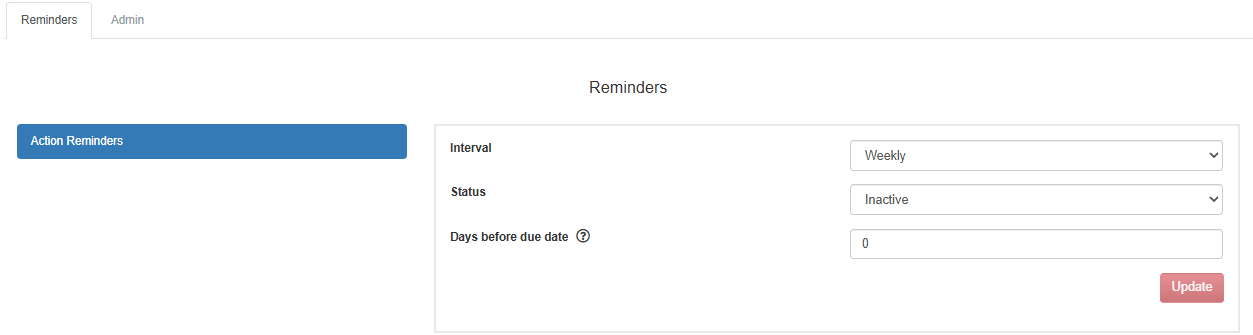
On the Reminders tab, find Action Reminders.
-
Under Interval, choose how often the same action is reminded again, for example daily or weekly.
-
Under Status, choose active to send reminders, or inactive to stop them.
-
Under Days before due date, enter how many days before the due date reminders start. Enter 0 to remind only once an action is overdue. The tooltip says: “Number of days before the due date to send a reminder email. Set to 0 to send notifications only after the action becomes overdue.”
-
Click Update.
What you should see
Section titled “What you should see”The reminder is saved with your values. From then on, reminders are sent once a day in the morning:
- Who gets one. The person who holds the action, that is, the one who is to act next: the responsible; the reviewer (normally the creator) when the work has been sent back for review; or the creator while a due-date change waits for approval. See Action statuses, who holds an action, and e-mails.
- Which actions. Actions that are overdue or due within the number of days you entered. Only actions with the status In progress are included: actions with the status New (created but not sent) and Closed actions are not reminded.
- How many e-mails. Each person gets one e-mail a day at most, listing all their actions that are due for a reminder that day.
- How often. After an action has been reminded, it is reminded again when the chosen interval has passed, as long as it is still open and due.
Good to know
Section titled “Good to know”- Not yet sent means no reminder. An action that was saved as a draft and never sent keeps the status New, so it is never reminded, even when it is overdue. Send it to have it reminded; see Create an action and send it to someone.
- The intervals. The Admin tab holds the list of intervals you can choose from. Each interval has an English name, a Norwegian name and a number of days, and you can add or change intervals there. An interval that is in use by a reminder cannot be deleted.