When does "Document updated" change in the KPI list?
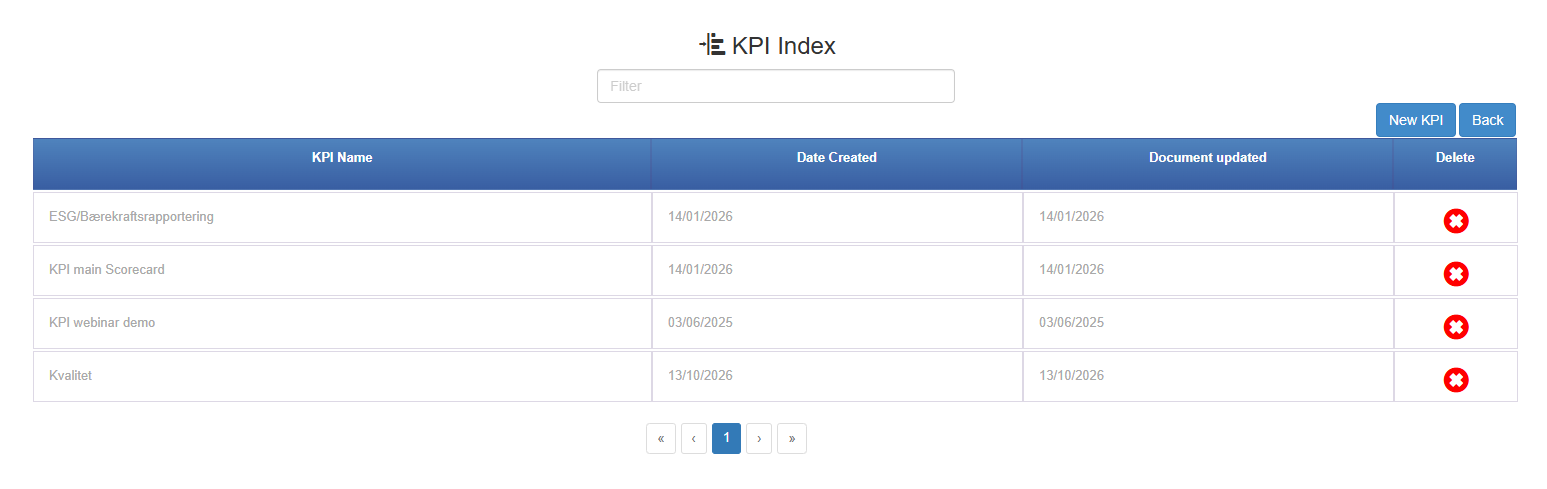
Document updated in the scorecard list changes when the scorecard is renamed while its copy for the highest year is shown, or when a copy for a new highest year is created. It does not change when values are entered. Date Created next to it is the date the copy for the highest year was created, not the date the scorecard was first made. Neither date tells you how recent the figures in the scorecard are.
Before you start
Section titled “Before you start”- The KPI Scorecard module must be enabled for your company; Antenor enables it on request. If the menu entry is missing, either the module is not enabled, you do not have at least the Read right on the KPI row, or you have no scorecard you can read and no Create right on the KPI row: ask your user administrator first, then Antenor support.
- You see a scorecard in the list only if you have at least the Read right on its row and on the KPI row; see Rights, years, favourites and Excel export in KPI Scorecard.
- The two date columns are hidden on phone and tablet screens. Use a wider screen to see them.
- In the left menu, click KPI Scorecard. The KPI Index page opens.
- Find the scorecard in the list.
- Read the date in the Document updated column. Date Created is the column to its left.
What you should see
Section titled “What you should see”Each scorecard has one row with its KPI Name, Date Created and Document updated. Dates are shown without a time and follow the language you chose in the top bar: 13.10.2026 with Norwegian, 13/10/2026 otherwise.
Document updated changes when:
- the scorecard is created (both dates are set to that day)
- the scorecard is renamed with the pencil next to the scorecard name, with the tooltip Edit name, while the copy for the highest year is shown (anyone with the Edit right or higher on the scorecard’s row can do this). A new name applies only to the copy for the year you are looking at, so renaming another year’s copy changes neither the name nor the date in the list
- a copy is created for a year higher than the scorecard’s current highest year (both dates change; see below)
The date does not change when you or others:
- type, change or clear month values or targets
- add, rename, reorder or delete headers or rows
- change boundaries, calculation type, graph type or info texts
- switch Show all months on or off, or open and close sub-rows
- grant or change rights
- add the scorecard to favourites
- click Export xls
Figures from documents do not count as an update either, however often they change.
Good to know
Section titled “Good to know”Each year is a separate copy. A scorecard keeps one copy per year. The list shows the copy for the highest year, so both dates belong to that copy. Opening the scorecard from the list shows the copy for the current calendar year, which is a different copy when a later year exists. A new copy is created when someone chooses a year that has no copy in Select KPI Year or in Choose year to compare with : in the graph settings (anyone who can open the scorecard can do this), or when someone opens the scorecard in a new calendar year that has no copy yet. The new copy keeps the headers, rows, boundaries, targets, calculation types and sources.
If the new copy is for a higher year than any existing copy, it becomes the one the list shows, and Date Created and Document updated both jump to that day. This is why a scorecard made years ago can show a creation date from this year. A copy created for an older year does not change the list.
Same name, different date. In the system row dialog there is a date option that is also called Document updated. That one is the last-update date of each document counted by the row, and has nothing to do with this column.
No date for individual values. The scorecard does not show when a single value was last entered. If you need to know whether manual rows are up to date, check which months are filled in.